Four facets of attitude
Weight, Heat, Bite and Air describe the musical result instead of the circuit.
TOOLS THAT MOVE SOUND FORWARD.
ANALOG ATTITUDE PROCESSOR
HYPER was created for the moment a clean recording needs personality. It combines broad-stroke tone, saturation and transient attitude in one instinctive instrument.
NEW LOOK · FOUR ILLUMINATED THEMES · Release details to follow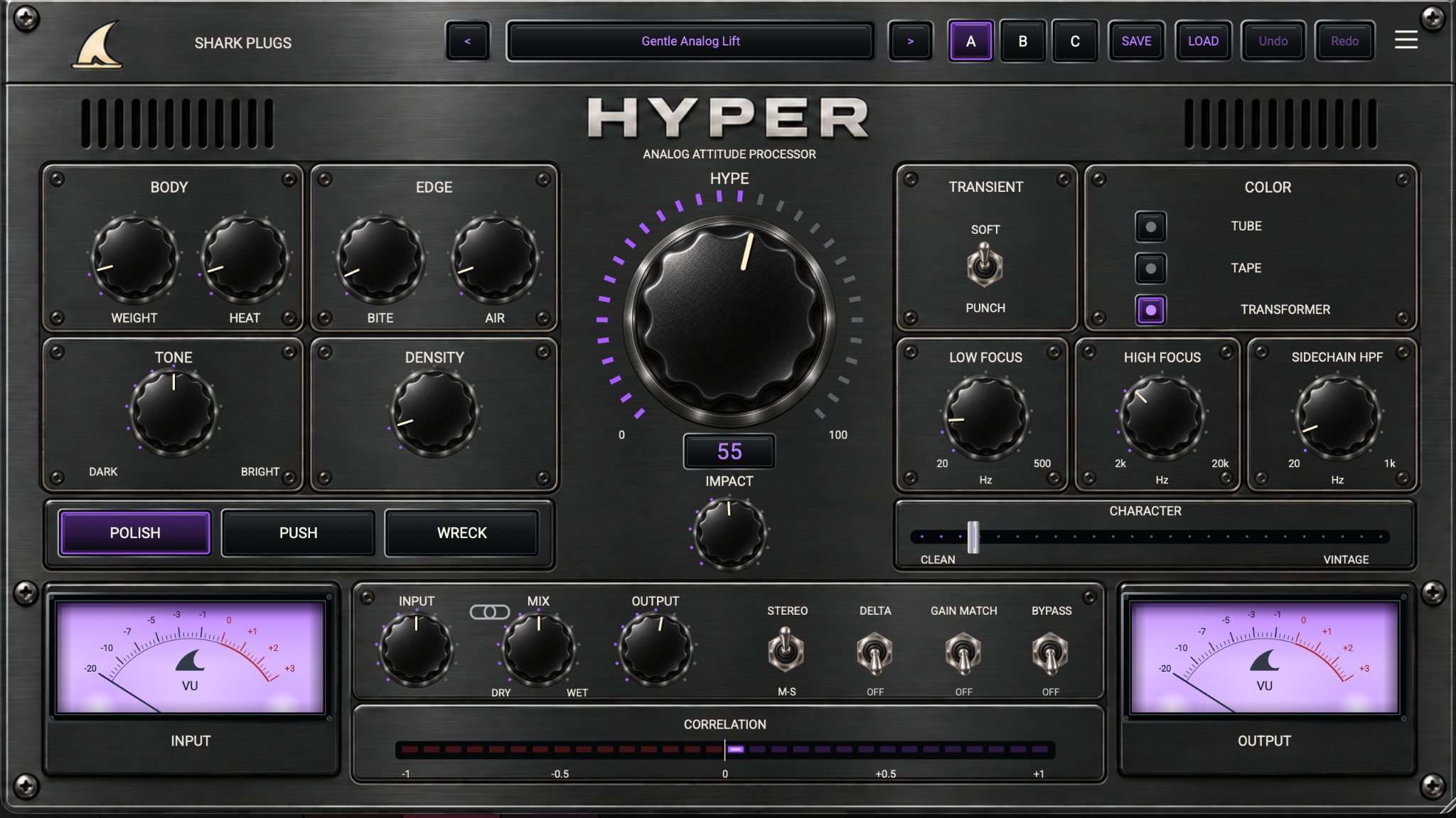
START HERE · PRODUCT VIDEO
The product demonstration will live here first—before the deeper explanation, workflows and manual.
THE IDEA
Build Body and Edge, choose Tube, Tape or Transformer color, then drive the central HYPE control. Polish, Push and Wreck set the attitude range while Character, Impact and linked gain control keep the result musical and honest.
GRAPHITE EDITION
Scalloped vintage knobs, glass buttons and illuminated Shark-branded VU-style meters. Click the Shark logo in HYPER to give the whole interface a coordinated amber, purple, red or blue accent.
WHAT IT GIVES YOU
Weight, Heat, Bite and Air describe the musical result instead of the circuit.
Tube, Tape and Transformer change the density and harmonic character.
Impact, Character, Input/Output Link, A/B/C, Delta and Gain Match make bold color practical.
PRODUCT RESOURCES
Explore the complete workflow or get the concise product overview. The HYPER documents are ready to read and download.
An eight-page guide to the refreshed controls, illuminated themes, presets, signal path and practical mastering and mix-bus workflows.
OPEN MANUAL →02 · PRODUCT OVERVIEWA three-page introduction to HYPER’s sound, graphite interface, four illuminated themes and hands-on workflow.
OPEN BROCHURE →QUESTIONS, ANSWERED
Clear answers about HYPER’s attitude architecture, analog colors, linked gain workflow and mastering-first design.
HYPER is a mastering-first analog attitude processor. It adds weight, heat, bite, air, density and transient movement so a clean recording feels more finished, physical and alive. It can work subtly on a master or more boldly on buses and individual sources.
HYPER is not one conventional compressor or one fixed saturation curve. It combines parallel nonlinear color, broad tonal reinforcement, fast-versus-slow transient shaping and a Clean-to-Vintage behavior morph. The controls describe musical results while the deeper architecture coordinates several processes underneath.
HYPE sets the overall amount of processed attitude. Polish keeps the range restrained for subtle finishing, Push adds stronger movement and forwardness, and Wreck provides the boldest parallel drive. The squared HYPE response gives fine control near zero and increasingly dramatic movement toward the top.
Tube provides rounded low-order density, Tape gives smoother symmetric saturation and softened edges, and Transformer adds firmer asymmetric authority. Character then morphs the behavior from tight, open bus-style glue toward a darker, rounder vintage response with restrained texture near the extreme.
When the link is active, raising Input lowers Output by the same number of decibels, letting you drive the color harder without an automatic level jump. Gain Match then performs a slower energy comparison and applies limited compensation, helping you judge whether the processing truly improves the record rather than merely making it louder.
HYPER was designed first for mastering and mix-bus work, but it also works on drums, vocals, bass, guitars and synths. A free trial is planned with the official installers. The release is intended for Audio Unit and VST3 on macOS, with VST3 for Windows.
Click the Shark logo to cycle amber, purple, red and blue. In the refreshed 0.20.4 interface, both VU-style meter faces follow the accent colour, with soft internal lamp glow, recessed shadows and glass highlights. Themes change the visuals only and are stored with the plugin session.
Mix blends the parallel attitude path before Character. Character can still shape the signal at zero Mix. Use Bypass for a complete untreated comparison.
The current HYPER interface, updated user manual and brochure are shown here. Check the download section for current installer availability.
TRY IT ON YOUR MUSIC