Transient Push that genuinely hits
Fast-versus-slow onset detection adds focused attack energy without block-wide gain movement, pumping or wobble. It delivers punch you can feel while the groove stays intact.
TOOLS THAT MOVE SOUND FORWARD.
ANALOG IMPACT PROCESSOR
MAXI Impact was built for the moment a good mix needs more authority: deeper weight, stronger density, richer color and a front edge that moves the speakers without flattening the music.
RELEASE CANDIDATE · MANUAL · BROCHURE · 140 PRESETS · VST3 · AU · macOS · Windows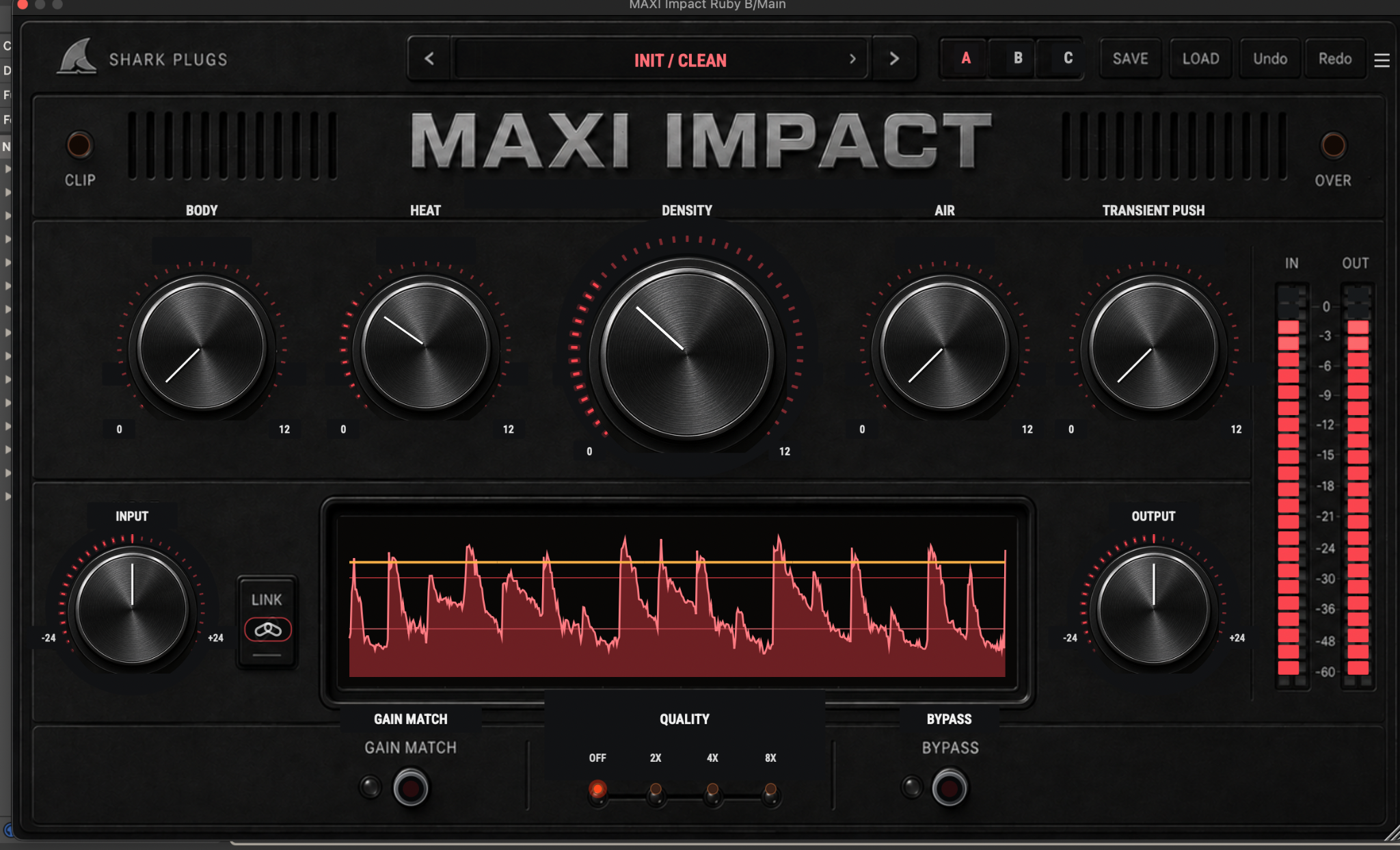
START HERE · PRODUCT VIDEO
The product demonstration will live here first—before the deeper explanation, workflows and manual.
THE IDEA
Shape the foundation with Body, bring quiet information forward with Density, add nonlinear color with Heat and open the ceiling with Air. Then use Transient Push to restore genuine attack and physical movement—the standout finishing move that makes drums, buses and complete masters feel alive.
WHAT IT GIVES YOU
Fast-versus-slow onset detection adds focused attack energy without block-wide gain movement, pumping or wobble. It delivers punch you can feel while the groove stays intact.
Body, Density, Heat, Air and Transient Push separate weight, detail, harmonic authority, openness and motion into five immediate musical decisions.
Gain Match, linked Input/Output trim, Off-to-8x quality, A/B/C comparison, 140 factory presets and four live themes keep strong processing controlled and trustworthy.
PRODUCT RESOURCES
Explore the complete workflow or get the concise product overview. The MAXI Impact documents are ready to read and download.
A 14-page Engineering Edition covering the complete signal path, five impact engines, nonlinear mathematics, Transient Push detector, Gain Match, quality modes, workflows and verification.
OPEN MANUAL →02 · PRODUCT OVERVIEWA focused four-page introduction to MAXI Impact’s sound, controls, mastering workflow and production roles.
OPEN BROCHURE →QUESTIONS, ANSWERED
Clear answers about MAXI Impact’s five engines, standout Transient Push, Gain Match and quality workflow.
MAXI Impact is an analog-style impact processor designed to add weight, density, harmonic color, openness and transient authority. It combines five complementary engines—Body, Density, Heat, Air and Transient Push—in one immediate interface.
No. It is optimized for mastering and mix-bus work, but it also works beautifully on drums, vocals, bass, guitars, keyboards and synths. Lower settings provide subtle finishing, while stronger settings can reshape individual sources and parallel buses.
Body strengthens the focused low-frequency foundation. Density brings quieter musical information forward while softly containing regenerated peaks. Heat adds harmonic saturation, texture and controlled peak rounding. Together they make a source feel larger without simply turning it up.
Transient Push compares fast and slow signal movement, identifies genuine musical onsets and adds a focused attack component. It creates physical punch and front-edge definition without applying block-wide gain changes that can cause pumping or wobbling. It is especially effective on drums, mix buses and complete masters.
Gain Match compares the processed signal with the original input and gradually compensates for the loudness difference. This produces a more honest bypass comparison, helping you decide whether the processing genuinely improves the music. It is off by default and can be engaged deliberately when you are ready to compare.
Use Off or 2x while producing when CPU efficiency matters. Select 4x for most mixing, bus processing and final decisions. Use 8x for exposed nonlinear processing or critical mastering work. Higher settings increase the internal processing quality of the Body and Heat stages but require more CPU.
MAXI Impact includes 140 factory presets plus Init across Mastering, Mix Bus, Vocals, Drums, Guitars, Bass, Keys, Utility and Pro Engineers. The named engineer collections are fictional creative viewpoints—not endorsements or models of real individuals.
Link moves Input and Output inversely during a live trim adjustment so you can change drive while preserving working level. A/B/C stores three complete parameter snapshots together with their preset identities for fast, repeatable comparison.
Yes. Open the top-right menu to select 80%, 100%, 120% or 150%. The same menu provides theme and manual access, and your interface choices are recalled with the plug-in state.
TRY IT ON YOUR MUSIC